
Four Corner Funding Partner Portal Walkthrough Guide
This training guide provides partners with a complete walkthrough of the Four Corner Funding Partner Portal, including lead management, borrower intake, client tracking, funding review, commissions, payments, appointments, resources, user access, and white-label operational tools.
How to Use This Training Guide
Each section below includes a short overview of the module and a direct video walkthrough. Partners should watch each module in order to understand how the platform supports lead flow, borrower management, underwriting visibility, funding progression, operational tracking, and long-term partner growth.
This page should be used as a central training resource for new partner onboarding, internal team training, white-label staff education, and ongoing platform reference.
Recommended Viewing Order
Start with the Dashboard, then move through Leads, Intake & Review, Clients, Commissions, billing modules, appointments, resources, team management, permissions, and CMS tools.
1. Partner Dashboard
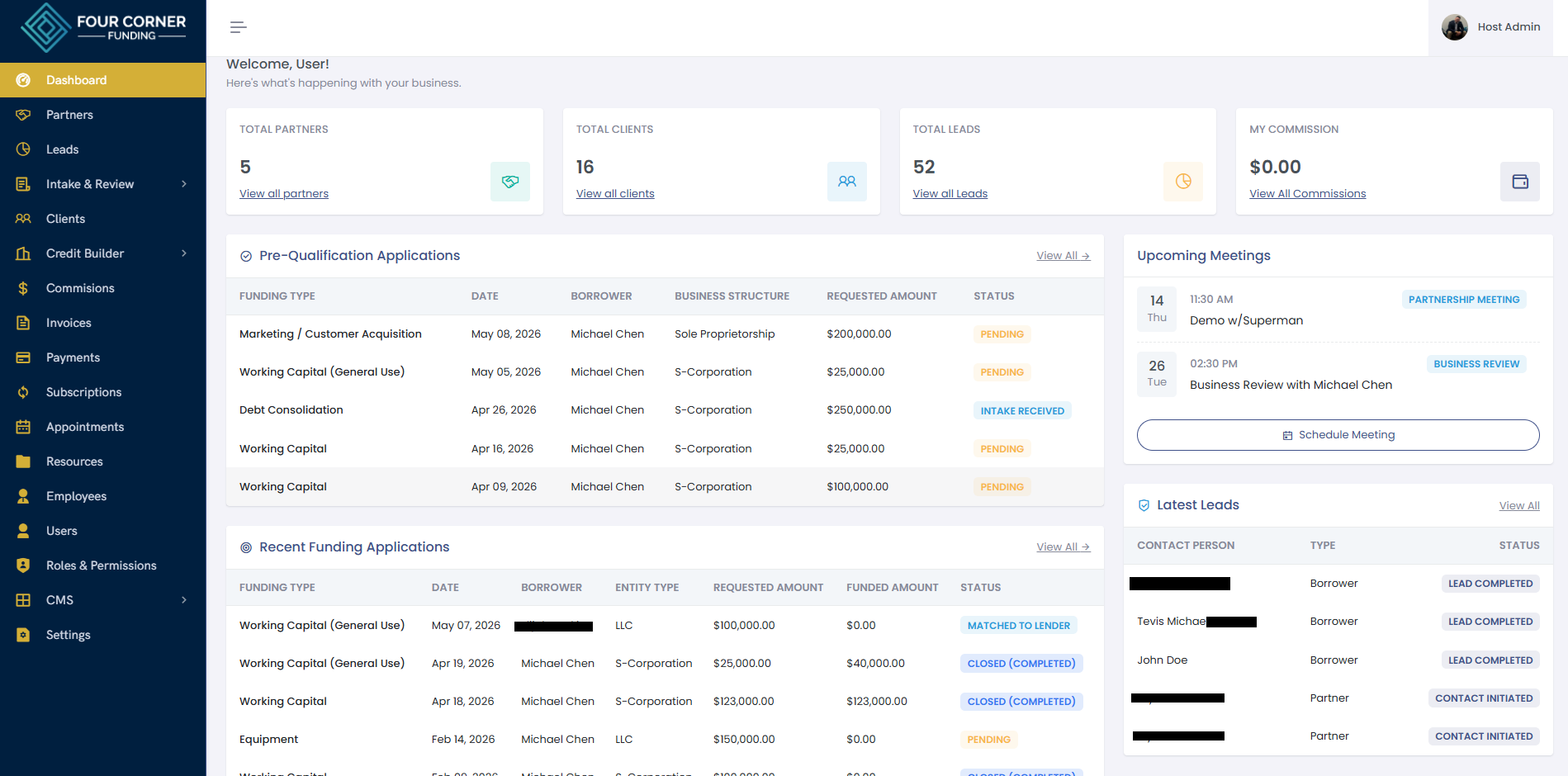
The Partner Dashboard is the central command center for monitoring platform activity. Partners can review lead activity, pre-qualification applications, funding progress, meetings, recent clients, operational metrics, and overall pipeline visibility from one place.
Watch this video to learn how to monitor platform activity and navigate the main dashboard.
▶ Watch Dashboard Walkthrough2. Leads
The Leads module helps partners manage incoming opportunities, track lead status, review contact information, organize referral sources, and move qualified prospects through the funding workflow.
Watch this video to understand how to organize and manage leads inside the portal.
▶ Watch Leads Walkthrough3. Intake & Review
The Intake & Review module is where partners can monitor borrower applications submitted through the portal. Partners can review Pre-Qualification submissions and Funding Review activity as files move through the funding process.
Pre-Qualification
Each time a borrower completes a pre-qualification form, the application appears inside this section. Partners also receive notifications, helping them identify new funding opportunities as they enter the system.
Funding Review
Funding Review allows partners to monitor funding progression, application status, requested amounts, funded amounts, and commission-related activity once files move deeper into the process.
Watch this video to understand how borrower intake and funding review workflows operate.
▶ Watch Intake & Review Walkthrough4. Clients
The Clients module is where active borrower records are managed. Partners can review client information, business financials, document checklists, uploaded documents, task lists, agreements, activity history, emails, and events connected to the file.
This section helps centralize borrower management and gives partners a clearer view of client readiness, documentation, communication, and operational progress.
Watch this video to learn how to manage active client files.
▶ Watch Clients Walkthrough5. Commissions
The Commissions module allows partners to track funded deals, partner commission amounts, payment status, funded amounts, administrative commissions, and payout visibility.
This section gives partners transparency into commission activity tied to funded client files.
Watch this video to learn how commission tracking works inside the platform.
▶ Watch Commissions Walkthrough6. Invoices
The Invoices module allows partners and administrative users to review invoice activity, payment status, invoice amounts, billing records, and collection visibility.
Watch this video to understand invoice tracking and billing visibility.
▶ Watch Invoices Walkthrough7. Payments
The Payments module provides visibility into payment transactions, payment statuses, invoice IDs, transaction IDs, payment methods, and completed payment activity.
Watch this video to learn how payment tracking works inside the portal.
▶ Watch Payments Walkthrough8. Subscriptions
The Subscriptions module helps partners monitor active subscriptions, enrollment types, payable amounts, installment schedules, platform fees, and subscription status.
Watch this video to understand subscription tracking and enrollment visibility.
▶ Watch Subscriptions Walkthrough9. Appointments
The Appointments module allows partners to schedule and manage meetings directly inside the portal. Calendar activity can sync with Google Calendar and Microsoft Office 365 calendars, helping partners maintain better scheduling coordination across their existing work calendar.
Watch this video to learn how appointment scheduling and calendar synchronization work.
▶ Watch Appointments Walkthrough10. Resources
The Resources module gives partners access to training content, educational materials, downloadable assets, business service resources, Tier 0 readiness guidance, and support information.
This section will continue expanding with additional tools, partner education, business setup resources, and platform training content.
Watch this video to learn how to use the Resources center.
▶ Watch Resources Walkthrough11. Employees
The Employees module allows organizations to manage internal employee records, department assignments, staff information, employment status, and operational team structure.
Watch this video to understand employee management inside the portal.
▶ Watch Employees Walkthrough12. Users
The Users module allows administrators to manage platform user accounts, assigned roles, account status, contact information, password access, and operational user administration.
Watch this video to learn how user account management works.
▶ Watch Users Walkthrough13. Roles & Permissions
The Roles & Permissions module controls access levels across the platform. Administrators can create custom roles, assign permissions by module, and control what users can view, create, edit, approve, or manage.
This section is important for operational security, white-label partner management, department separation, and scalable platform administration.
Watch this video to understand role-based access control inside the portal.
▶ Watch Roles & Permissions Walkthrough14. CMS
The CMS module supports website content management, blog publishing, SEO settings, site branding, and white-label digital marketing infrastructure.
White-label and regional partners can use the CMS to support online exposure, publish educational content, manage SEO pages, and maintain stronger digital visibility through their branded platform presence.
Watch this video to learn how CMS tools support website content, blogs, and SEO management.
▶ Watch CMS WalkthroughFinal Notes for Partners
Partners should use this walkthrough guide as the primary training reference for understanding how to navigate the Four Corner Funding Partner Portal.
The platform was designed to help partners manage leads, borrowers, intake workflows, funding visibility, commissions, billing, scheduling, resources, internal users, permissions, and website content from one organized ecosystem.
Additional training resources, platform updates, and walkthrough videos will continue to be added over time.
Need Additional Support?
Contact the Four Corner Funding support team or schedule a platform walkthrough if you need additional help navigating the partner portal.
Schedule a Platform Walkthrough